Tag: ProductCart

  • ProductCart and Mobile Responsive Design

    ProductCart and Mobile Responsive Design

    [et_pb_section fb_built=”1″ _builder_version=”4.16″ global_colors_info=”{}” theme_builder_area=”post_content”][et_pb_row _builder_version=”4.16″ global_colors_info=”{}” theme_builder_area=”post_content”][et_pb_column type=”4_4″ _builder_version=”4.16″ global_colors_info=”{}” theme_builder_area=”post_content”][et_pb_text _builder_version=”4.16″ global_colors_info=”{}” theme_builder_area=”post_content”]

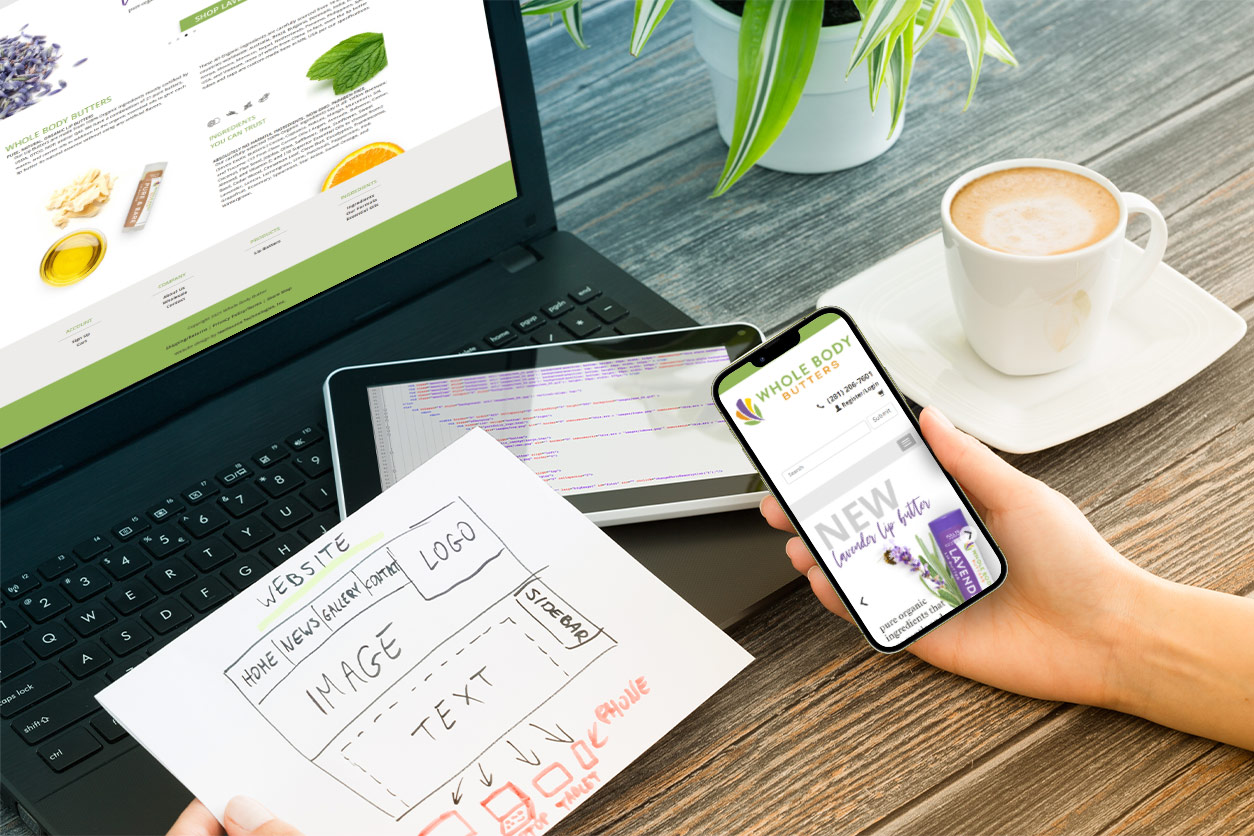
    Your e-commerce website usability is vital for your website’s success! Shoppers need to be able to visit your website whenever the need arises, from whatever device they have available. Often times, the most readily available device is a cell phone. Due to this, a major topic during the website build conversation is mobile optimization and mobile responsiveness of websites. ProductCart customers should understand how mobile responsive design in a website’s theme is just as important as the e-commerce solution used to sell its products!

    The Quick History of Mobile Responsive Design

    As of the late 2000’s and 2010’s, more and more websites were designed to be “mobile friendly.” However, that isn’t the same as mobile responsive. A Mobile Responsive Design is defined as a website design that can be displayed on a mobile device and will automatically adjust its size, layout, and proportions in a legible way to fit the specific device you’re on. Basically, if you have a website, the code in the sites theme when built will decide if it automatically resizes and functions well on certain mobile devices…or not. A website’s theme is the framework of the site. It includes the layout and style of your website design. It’s the code used to create your website that provides the structure, style, and design of a website. All ProductCart designed sites are created to be mobile responsive, now.

    [/et_pb_text][/et_pb_column][/et_pb_row][et_pb_row column_structure=”1_2,1_2″ _builder_version=”4.16″ custom_margin=”-25px||||false|false” global_colors_info=”{}” theme_builder_area=”post_content”][et_pb_column type=”1_2″ _builder_version=”4.16″ global_colors_info=”{}” theme_builder_area=”post_content”][et_pb_image src=”https://blog.productcart.com/wp-content/uploads/2021/10/Untitled-design-63.png” alt=”Mobile responsive websites are the current and the future” title_text=”Mobile responsive websites on tablet and smartphone” align=”center” _builder_version=”4.16″ global_colors_info=”{}” theme_builder_area=”post_content”][/et_pb_image][/et_pb_column][et_pb_column type=”1_2″ _builder_version=”4.16″ global_colors_info=”{}” theme_builder_area=”post_content”][et_pb_text _builder_version=”4.16″ global_colors_info=”{}” theme_builder_area=”post_content”]

    Over the years, the ProductCart team has followed best practices in web design to provide customers with an e-commerce store that has as much mobile functionality as possible. How a website displays in the mobile environment, on smart phones, tablets, and other small devices, is an also an important consideration for a site’s search engine ranking, or SEO ranking. Because mobile display is such an important factor for both customers usability and SEO value, it’s important to ProductCart!

    [/et_pb_text][/et_pb_column][/et_pb_row][et_pb_row _builder_version=”4.16″ custom_margin=”-25px||||false|false” global_colors_info=”{}” theme_builder_area=”post_content”][et_pb_column type=”4_4″ _builder_version=”4.16″ global_colors_info=”{}” theme_builder_area=”post_content”][et_pb_text _builder_version=”4.16″ global_colors_info=”{}” theme_builder_area=”post_content”]

    Though ProductCart software works with mobile optimized websites, the software cannot make a site that is not currently mobile optimized, function responsively on mobile devices.

    ProductCart Customers and Their Sites

    So what does all of this mean for your ProductCart site or third party site with ProductCart software? Here are the details!

    ProductCart Versions 5.0 and Beyond

    In earlier versions of ProductCart – everything before the arrival of version 5.0 – mobile usability was provided through the use of a separate set of display files that were used when the site was accessed on a smart phone browser. The mobile display files were a limited approach, however, and required considerable additional work to correctly implement.  All versions since ProductCart 5.0 – including the new v5.4 release – replace the mobile file set with a single display file set, or theme, that uses a mobile-responsive approach to the site design. Mobile-responsive design gives a single theme the ability to display accurately on a wide range of devices by using the popular Bootstrap framework as the basis for all user-facing pages.

    [/et_pb_text][/et_pb_column][/et_pb_row][et_pb_row column_structure=”1_2,1_2″ _builder_version=”4.16″ custom_margin=”-25px||||false|false” global_colors_info=”{}” theme_builder_area=”post_content”][et_pb_column type=”1_2″ _builder_version=”4.16″ global_colors_info=”{}” theme_builder_area=”post_content”][et_pb_text _builder_version=”4.16″ global_colors_info=”{}” theme_builder_area=”post_content”]

    But…and this is an important caveat, ProductCart’s use of a mobile-responsive design framework doesn’t mean that your website will magically become properly mobile-responsive just because you’re running version 5-whatever of the software. Think of ProductCart’s Bootstrap framework as ‘responsive design ready’ and you won’t be far off the mark. If your website’s theme is mobile responsive, an online store powered by ProductCart will render your website on mobile devices!

    [/et_pb_text][/et_pb_column][et_pb_column type=”1_2″ _builder_version=”4.16″ global_colors_info=”{}” theme_builder_area=”post_content”][et_pb_image src=”https://blog.productcart.com/wp-content/uploads/2021/10/Untitled-design-62.png” alt=”Magical starburst on smart phone” title_text=”ProductCart doesn’t magically make your old website mobile responsive!” align=”center” _builder_version=”4.16″ global_colors_info=”{}” theme_builder_area=”post_content”][/et_pb_image][/et_pb_column][/et_pb_row][et_pb_row _builder_version=”4.16″ global_colors_info=”{}” theme_builder_area=”post_content”][et_pb_column type=”4_4″ _builder_version=”4.16″ global_colors_info=”{}” theme_builder_area=”post_content”][et_pb_text _builder_version=”4.27.4″ hover_enabled=”0″ global_colors_info=”{}” theme_builder_area=”post_content” sticky_enabled=”0″]

    Mobile Responsive Design for Custom Websites with ProductCart

    If you use one of ProductCart’s four standard Bootstrap themes, in a mobile environment the website will work properly without any more adjustments. For custom site designs, we recommend starting with the framework of the stock Bootstrap Clean theme and building out the customizations from that design core. You’ll want to make sure your site’s designer or developer has good working knowledge of both the general principles of mobile-responsive design and of the Bootstrap framework. Otherwise, even with the mobile-responsive capabilities built-in to the framework, you’ll end up with a site that doesn’t always display correctly across the full range of mobile devices and screen sizes.

    [/et_pb_text][et_pb_cta title=”Is your ProductCart website mobile optimized?” button_url=”http://www.productcart.com/contact.asp” button_text=”Contact Us Today!” _builder_version=”4.16″ header_font_size=”30px” background_color=”#3367ce” custom_button=”on” button_text_color=”#000000″ button_bg_color=”#ffffff” button_border_width=”5px” global_colors_info=”{}” theme_builder_area=”post_content”]

    Was your website built recently? Is it mobile responsive? If you’re not sure, contact us! The ProductCart team can review your current ProductCart website or create a new one for the latest mobile optimized experience!

    [/et_pb_cta][/et_pb_column][/et_pb_row][/et_pb_section]

  • How Apple’s iOS 14 is Impacting Facebook Ads

    How Apple’s iOS 14 is Impacting Facebook Ads

    [et_pb_section fb_built=”1″ _builder_version=”4.4.7″][et_pb_row _builder_version=”4.4.7″][et_pb_column type=”4_4″ _builder_version=”4.4.7″][et_pb_text _builder_version=”4.4.7″]

    Apple iOS 14 Updates and Your Facebook Ads

    There are many moving parts in the mainstream media regarding apps, finance, the internet, and other related topics. A large spotlight has been put on Facebook and Apple’s rivalry over user privacy, policies, and how they impact one another. While media may speculate on the effects of these new changes, we have the need-to-know information and recommendations for Facebook ad techniques in the ecommerce and online retail industries.


    About Facebook Ads, Apple, and User Privacy

    • Facebook gathers and analyzes user activity while on their app to help target paid ads to relevant users, then shows those ads to the best matched user.
    • Over the past few years, Facebook ads have also relied on user activity from other apps and websites to make their targeting more accurate.
    • Apple users have been able to decline or “opt out” of sharing their data from outside sources on Facebook since the Apple iOS 10 update, released in September 2016.

    [/et_pb_text][/et_pb_column][/et_pb_row][et_pb_row _builder_version=”4.4.7″][et_pb_column type=”4_4″ _builder_version=”4.4.7″][et_pb_button button_text=”Click Here for Expert Assistance with Your Ecommerce Brand’s Social Media” button_alignment=”center” _builder_version=”4.4.7″ custom_button=”on” button_text_color=”#3860a0″ button_bg_use_color_gradient=”on” button_bg_color_gradient_start=”#ffd670″ button_bg_color_gradient_end=”#f99034″ button_border_width=”4px” button_border_color=”#164caf” button_font=”|600|||||||” button_icon=”%%28%%” button_icon_color=”#164caf” hover_enabled=”0″ box_shadow_style=”preset2″ url_new_window=”on”][/et_pb_button][/et_pb_column][/et_pb_row][et_pb_row _builder_version=”4.4.7″][et_pb_column type=”4_4″ _builder_version=”4.4.7″][et_pb_text _builder_version=”4.4.7″]

    Privacy Policy for Off-Facebook Activity

    After installing the Apple iOS 14 update, users will receive notifications when opening the Facebook app for the first time post update. These notifications will ask the user if they will allow Facebook to see their “Off Facebook Activity”.

    [/et_pb_text][et_pb_image src=”https://blog.productcart.com/wp-content/uploads/2021/06/FBPreApplePromptPromptTest.jpg” alt=”ecommerce and Facebook ads with iOS14″ title_text=”FBPreApplePromptPromptTest” _builder_version=”4.4.7″][/et_pb_image][/et_pb_column][/et_pb_row][et_pb_row _builder_version=”4.4.7″][et_pb_column type=”4_4″ _builder_version=”4.4.7″][et_pb_text _builder_version=”4.4.7″]

    As the image above shows, one privacy notification will come from the Facebook app (left). The second will be a pop-up notification from your Apple device (right).

    Both will ask you if you will allow Facebook to track user activity while using other apps and websites not owned by Facebook. Users can choose to not share activity from other apps with Facebook. However, this will not stop Facebook advertising from using your activity while on their apps for ad targeting purposes.

    [/et_pb_text][et_pb_text _builder_version=”4.4.7″]

    Apple iOS 14 Update Won’t Hurt In-App Facebook Advertising

    The majority social media leads and conversions in most industries happen from ads seen while on the Facebook family of apps, like Facebook and Instagram. If users choose to not share their off-Facebook activity with the app, Facebook will not show that person paid ads while they are using other free apps. They will only see paid ads while on Facebook or Facebook-owned apps, such as Instagram and WhatsApp. Since most ecommerce websites don’t receive their conversions in third-party apps, this change is likely irrelevant.

    [/et_pb_text][/et_pb_column][/et_pb_row][et_pb_row column_structure=”1_2,1_2″ _builder_version=”4.4.7″ min_height=”375px”][et_pb_column type=”1_2″ _builder_version=”4.4.7″][et_pb_image src=”https://blog.productcart.com/wp-content/uploads/2021/06/iStock-1280293302.jpg” alt=”Facebook Ads and Ecommerce with iOS14″ title_text=”Social Media Mobile Digital marketing Isometric Concept. 3d apps icons, loudspeacker, target on smartphone screen. Business analysis vector illustration for banner, web site, mobile app, infographics” _builder_version=”4.4.7″][/et_pb_image][/et_pb_column][et_pb_column type=”1_2″ _builder_version=”4.4.7″][et_pb_text _builder_version=”4.4.7″]

    Facebook Ads Reporting Numbers Will Only Appear Low

    Ads seen while users are on the Facebook App or website will be minimally affected, if at all. If you are advertising in the app directly (marketplace or paid campaigns), your ads will still be seen by the same audience currently seeing them.

    This is done through targeting in the Facebook advertising campaign manager. Users build an audience based on age, demographics, location, and interests of their target customers.


    [/et_pb_text][/et_pb_column][/et_pb_row][et_pb_row _builder_version=”4.4.7″ custom_padding=”0px|||||”][et_pb_column type=”4_4″ _builder_version=”4.4.7″][et_pb_button button_url=”https://www.netsourceinc.com/contact” url_new_window=”on” button_text=”Let NetSource Technologies’ Experienced Social Media Team Handle Your Facebook Ads” button_alignment=”center” _builder_version=”4.4.7″ custom_button=”on” button_text_color=”#ffffff” button_bg_use_color_gradient=”on” button_bg_color_gradient_start=”#549bff” button_bg_color_gradient_end=”#003099″ button_border_width=”3px” button_border_radius=”5px” button_font=”|600|||||||” button_icon=”%%28%%” button_icon_color=”#ffffff” hover_enabled=”0″ box_shadow_style=”preset1″][/et_pb_button][et_pb_text _builder_version=”4.4.7″]

    Facebook Ads Conversions Explained

    An important step in the ad creation process is for the advertiser to define what actions they deem as successful from their audience. Successful actions are performed by a user seeing an ad is called a conversion.

     Examples of conversions: clicking a link on an ad to visit a web page, filling out a form linked from the ad, visiting your website through a Google search within a certain time frame of seeing your ad (through a process called pixel tracking), seeing an ad and either searching for or purchasing a product or service on that business’ website.

     Previously, Facebook reported a conversion if a user completed any of these types of actions within 28 days of seeing or interacting with an ad. Now, Facebook advertising reporting will only be able to report a user completing these successful actions within seven days of seeing or interacting with an ad. This does not mean you can’t get conversions after seven days, Facebook just wont be able to report that information to you.

    [/et_pb_text][/et_pb_column][/et_pb_row][et_pb_row column_structure=”3_5,2_5″ _builder_version=”4.4.7″][et_pb_column type=”3_5″ _builder_version=”4.4.7″][et_pb_text _builder_version=”4.4.7″]

    What Does This Mean for Your Ecommerce Store?

    Don’t let the news of this Apple iOS 14 update worry you. Facebook ads will be reporting less information, but this does not mean your advertising is any less effective! Plus, there are other reliable ways to track user actions and conversions from social media and Facebook advertising.

    Google Analytics is a great tool that reports traffic coming from social media posts and other digital advertisements to your site. With proper tracking in your social media ads, your business can see how effective your Facebook ads are at getting leads to your retail site. The fact is, changes made by the Apple iOS 14 update likely won’t affect your digital marketing results.

    [/et_pb_text][/et_pb_column][et_pb_column type=”2_5″ _builder_version=”4.4.7″][et_pb_image src=”https://blog.productcart.com/wp-content/uploads/2021/06/iStock-1213640629.jpg” alt=”Facebook Ads and Ecommerce Stores with iOS 14 – Online shopping concept illustration.” title_text=”Woman receiving a gift box from smartphone.” _builder_version=”4.4.7″][/et_pb_image][/et_pb_column][/et_pb_row][et_pb_row _builder_version=”4.4.7″][et_pb_column type=”4_4″ _builder_version=”4.4.7″][et_pb_text _builder_version=”4.4.7″]

    NetSource Media social media specialists recommend following the statistics of your paid social media accounts and monitoring the results on Google Analytics. Our in-house marketing professionals manage all client accounts this way. We ensure our client ads are reaching prospects and successfully earning quality leads from these conversions. While Facebook ads and social media marketing techniques are ever-changing, our thorough management processes ensure our clients’ success.

    [/et_pb_text][et_pb_cta title=”Have questions about Facebook advertising, social media changes, or management?” button_url=”https://www.netsourceinc.com/contact” url_new_window=”on” button_text=”Click Here to Talk Social Media” _builder_version=”4.4.7″ body_font=”|600|||||||” body_text_color=”#ffffff” use_background_color_gradient=”on” background_color_gradient_start=”#59cc53″ background_color_gradient_end=”#1b510a” custom_button=”on” button_text_color=”#ffffff” button_bg_color=”#ffffff” button_bg_use_color_gradient=”on” button_border_color=”#ffffff” button_icon=”%%28%%” button_alignment=”center” hover_enabled=”0″ box_shadow_style=”preset1″]

    Our social media experts at NetSource Technologies are here to help. We’ll stay up-to-date on the latest changes and implement our knowledge to help you growyour business through organic posting and paid Facebook ads.

    [/et_pb_cta][/et_pb_column][/et_pb_row][/et_pb_section]

  • ProductCart Version 5.3 Now Available!

    ProductCart Version 5.3 Now Available!

    Want to get the most out of your ProductCart store? Of course you do! Staying up to date with the newest releases allows you to take full advantage of all the fun and new features that ProductCart version 5.3 has to offer. ProductCart is committed to being the best possible eCommerce provider and ensuring all of our clients have the best security and performance on the market.  With our release of ProductCart 5.3, we hope to show you that you can have a successful eCommerce business, and that we are here to help!

    version5-3

    ProductCart 5.3 New Features

    Check out these exciting new features ProductCart has to help expand your eCommerce business!

    Home Page Slideshow Scheduler

    The new slideshow schedules is included with scripting revision in order to allow admin users to set dates and times for specific slides to appear in the slideshow rotation!

    Banner Manager

    Another new home page features, the Brand Manager allows admin users to create and schedule promotional text that can be placed anywhere on your storefront’s theme!! An added bonus, these text banners can also be scheduled ahead of time!

    Updated jQuery Library

    The centerpiece of the ProductCart 5.3 is the updated jQuery library. This comprehensive update is aimed to fix the library and issues with some of the security scans and recent browser updates. Soon, this update as well as the slideshow scripting will be made available as a patch for version 5.2.1 stores as well.

    Quick Order Entry

    This fun little update may seem small, but it allows customers to reorder previous orders. This is perfect for customers who frequently order the same products.

    Other new features in ProductCart 5.3 include:

    • The ability for Configurator users to set multiple default options in product configurations
    • A Categories and Brands Widget to enhance cross-selling

    Shortly following the release of ProductCart 5.3, the Notify Me app will be available in the ProductCart App section of the control panel. This app will allow your customers to sign up to receive an email notification when an item they’re interested in is back in stock!

    If you are interested in upgrading today, or maybe you are brand new to ProductCart and love the sound of our new releases..  Reach out to one of our eCommerce experts today to get you started on your ProductCart journey to eCommerce success!

  • Using CartStack + ProductCart to Recover 15% of Lost Sales

    Using CartStack + ProductCart to Recover 15% of Lost Sales

    2018 has brought with it several new challenges for ecommerce managers and digital marketers. You must be cognizant of hundreds (if not thousands) of things to ensure you’re maximizing sales & minimizing losses, when selling online. And the more of these things you can automate, the more you can focus your attention on other aspects of your business’ growth.

    That’s why we’re happy to announce a new ProductCart + CartStack integration!

    CartStack uses a series of automated, personalized & uber-relevant messages to help retailers maximize their current traffic and recover 15% or more of would-be lost customers.

    But wait… why are my shoppers leaving in the first place?

    Online shoppers have an attention span shorter than a goldfish! Not only that, but as time progresses, Forbes predicts online shopper behavior to continue to grow more sporadic & website visits to become less frequent for each shopper.

    The fact that shoppers are spending less and less time on our sites means we need to be able to quickly differentiate between which shoppers are our next “raving fans” and which have little interest in our products.

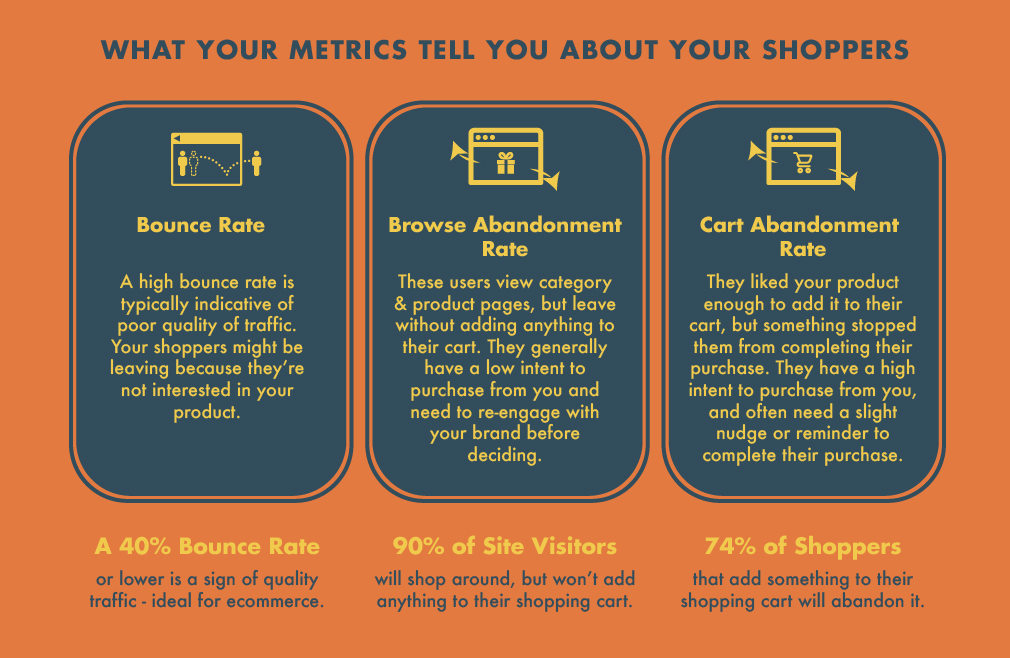
    Three simple website metrics can help you differentiate between these shoppers fairly simply.

    Metrics

    Sending The Right Message at the Right Time

    CartStack users have access to a Full Visitor Abandonment Recovery Suite to combat bounce rate, browse abandonment & cart abandonment at the same time. The “right message, right time” intelligent technology uses a combination of on-site retargeting & monitoring tools, and email recovery campaigns to help you convert more visitors.

    You’ll be able to identify your most promising leads & get more sales without running more traffic.

    So how does CartStack work?

    Integration with your ProductCart store takes only minutes. Once you’re setup, the software will begin to monitor your shoppers and capture email addresses from every page on your website, as they’re typed!

    From here, there are 4 different campaigns you can run within CartStack to boost on-site conversion & recover lost sales from abandoning visitors.

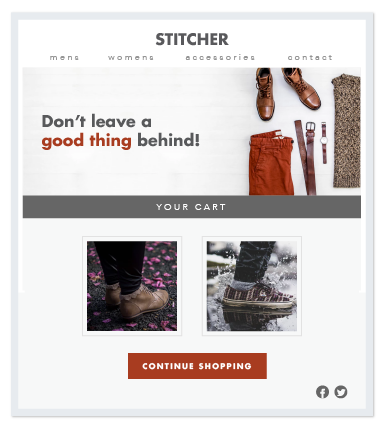
    Cart Abandonment Email Campaigns

    Cart Abandonment

    Re-engage your most qualified leads with conversion-focused abandoned cart email reminders to recover 15% of your lost sales. A/B split test email content, inject the product images your shoppers had in their cart & get inboxed every time with CartStack’s trusted ISP.

    Browse Abandonment Email Campaigns

    Around 90% of shoppers won’t add anything to their cart. Since you’ll continuously capture & cookie shoppers throughout your whole website, Browse Abandonment emails will re-engage your “window shoppers”, pushing them further through your conversion funnel and helping you recover an extra 4-8% of abandoned sales.

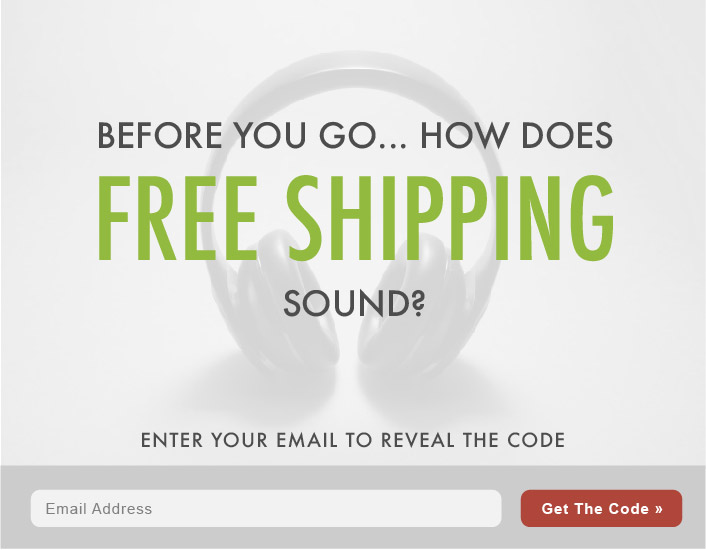
    Exit Intent or Delayed Popups

    Exit Intent

    Exit Intent Technology allows you to disrupt your shoppers’ exit with an enticing offer to boost your sales & improve conversion in 3 ways:

    1. Converting more shoppers while they’re still on the website, by presenting them with discount codes, shipping incentives, contests or other special offers they can use to complete their purchase.
    2. Sending cart & browse abandonment reminders to shoppers that provide email, but don’t complete their purchase while on your site.
    3. Importing these leads into future remarketing & email campaigns.

    With the right offer, you could capture around 20 – 40% more leads for use in your email campaigns, and convert an extra 3-5% of would-be lost traffic.

    “Send My Cart”

    When your shoppers simply aren’t ready to complete their purchase, Send My Cart will present them with the option to send themselves a reminder email, saving the items they had in their shopping cart. Your customers get to keep a wishlist of their favorite products from your store, and you’ll capture and remarket to even more leads.

    Other Tools to Boost Your Conversion

    A/B Split Testing

    Not sure which offer or email content your shoppers will respond to the best? With A/B split testing, you can quickly and efficiently figure out the perfect formula to get your abandoners back to your site & through the checkout line.

    Abandoned Session Replays

    Easily pinpoint & identify leaks in your conversion funnel with full session recordings of your abandoning website visitors, filtered & categorized based on shopper behavior.

    AI Product Recommendation Engine

    While only 7% of customers will click on “Recommended Items” in an email, they can account for up to 26% of additional sales! CartStack’s AI-based recommendation engine monitors your shoppers purchasing habits and recommends the products that they’ll be most likely to purchase right in the cart recovery email.

    Webhooks

    Integrate CartStack with your CRM or email program to automatically import CartStack leads for continued marketing.
    Best Practices for Recovering Revenue

    The metrics (open rate, click through rate) you’ll achieve with a revenue recovery campaign will almost always double those of a typical email marketing blast for 3 reasons: Timelines, Relevance & Personalization.

    Timeliness

    Cart & Browse Abandonment emails sent out within the first 20 minutes after the shopper abandons your site a 3 times as likely to be opened. For cart abandonment campaigns, a cadence of 3 emails over 3 -5 days max is ideal for most retailers. For browse abandonment campaigns, a much more rapid email sequence is ideal, since these shoppers are likely to forget about you much sooner.

    Relevance

    No online shopper is built alike. And for this reason, sending the same email message to all of your site visitors is one sure way to recover very little (if any) revenue.

    CartStack automatically segments your shoppers based on their interactions with your site, giving you the ability to dial in relevant messaging that will result in a higher number of recovered sales.

    Personalization

    Your shoppers are going to have the greatest response to email campaigns when they’re reminded of the items, images & descriptions of the products they abandoned while on your site.

    Once integrated with your platform, you can easily use their pre-built email templates to have product information & images imported into your email campaigns automatically.

    How to Install CartStack and Recover $1,000 Minimum for Free

    You can find the CartStack App by visiting the ProductCart App Market in your control panel. From the main menu navigate to “Settings > ProductCart Apps > App Store”.

    Not only will their integration team help you get setup and recovering revenue asap, you’ll never pay a dime until you recover at least $1,000 in lost revenue! And most new users recover enough sales in their first month to pay for the entire first year of service.

    Sign up for free trial of CartStack here to get started!

  • ProductCart Features: Integrating Your Social Media Accounts

    At ProductCart, one of the many great features of our e-commerce solutions is the ability to fully integrate your online business with your Social Media accounts, including Facebook, Twitter, Instagram, Pinterest, Google Plus & more.

    socialstuff1 (more…)

  • ProductCart 5 Drag and Drop Reordering

    ProductCart 5 features new functionality to help you more easily organize and promote categories and products on your website. As in previous versions of ProductCart, you can adjust the default display order of products and categories — but version 5 simplifies the process with a new, intuitive Drag and Drop Reordering function. (more…)

  • ProductCart 5 features Microdata and Open Graph markup

    To improve the search engine visibility of your ProductCart powered store, and to help deliver more accurate search results to your prospective customers, ProductCart 5 includes a new feature that automatically generates structured data markup for your site’s pages. (more…)

  • How to Succeed with Google+

    When you are running an online store, your online reputation is really important not only for SEO purposes, but also for organic traffic too. If the only online presence  you have is your ecommerce store, it is likely that you are missing out on  large opportunities with social media and organic traffic.  Just like any business, your online store is going to take some work to make it successful. Use Google+ to improve your site’s SEO.  Here are 5 tips for becoming successful with Google+. (more…)